Default your DropCatch wins to Whois privacy — How to
Tired of telemarketing and spam? Here’s how to fix it.
DropCatch is a great platform for capturing expired domain names that go through the complete registry deletion process.
There is one major annoyance, still: NameBright, where all of your purchased domains end up, doesn’t obscure Whois information by default. Since all of the domains you win at DropCatch appear to be fresh registrations, you’ll be flooded with emails and phone calls pitching you on web and app design services for the domains you win.
Fortunately, there’s a solution that enables you to default all of your DropCatch wins to Whois privacy. Here’s how to do it.
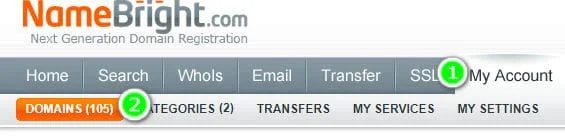
Following logging into your account, select “My Account” and “Categories”:
Next, look for “DropCatch” in the list and click “Settings” in the corresponding row:
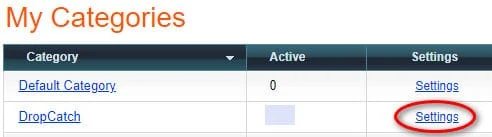
Then, scroll down to the “Privacy Protection” box and click to enable it by default for the category. (You can also do other nifty things here, like automatically set up the nameservers for domains you win.)
Note that NameBright charges $2.95 per year for Whois privacy but the first year is free. So you’ll want to transfer your domains out within a year or understand that you’ll be billed extra for keeping privacy.
Also, domain investors need a way for potential buyers to contact them, so make sure your domain points to a landing page with contact capabilities.